Set up from your TV.
Stand at the TV with the remote in hand, and this page open on your phone to follow along. For a Google TV, Android TV or Fire TV, with no cables.
The best way is still setting up with AI. It works on any TV and does the steps for you. This page is the by hand way, on the TV itself.
What you need
Guest TV lives on a computer at your place. The TV shows it and your guests' phones talk to it.
- A Google TV, Android TV or Fire TVTCL, Hisense Google TV, Sony, Philips Android, Kogan, a Chromecast, or a Fire TV Stick on Fire OS (not the Stick 4K Select). Something else? Check your TV.
- Guest TV running on a computer that stays onA Mac, a Linux box or a Raspberry Pi. Not running yet? Do steps 1 to 3 of Computer setup first (one command and a few questions), or let AI do it.
- The TV and the computer on the same Wi-FiYour guests' phones join it too, from a code on the TV.
- The TV remote, and about ten minutesPlus the computer's number from the end of setup, in case the TV asks for it.
Install Downloader
Open the TV's app store (Google Play on Google TV and Android TV, the Amazon Appstore on a Fire TV), search for Downloader and install the free one by AFTVnews.
Type the code, press Go
Open Downloader and type this code with the TV remote:
Downloader code1061533Press Go. It downloads the Guest TV app. If the code does not work, type couchtv.sites.underseage.studio/
guest instead and press Go.Let Downloader install it
The first time, the TV asks to let Downloader install apps. Press Settings, switch Downloader on, then press Back.
On a Fire TV it is Settings, My Fire TV, Developer options, Install unknown apps. Then press Install, then Open.
It finds your computer
In a few seconds Guest TV finds your computer on your Wi-Fi and shows the welcome screen. If it does not, type the number the computer showed at the end of setup and press Connect.
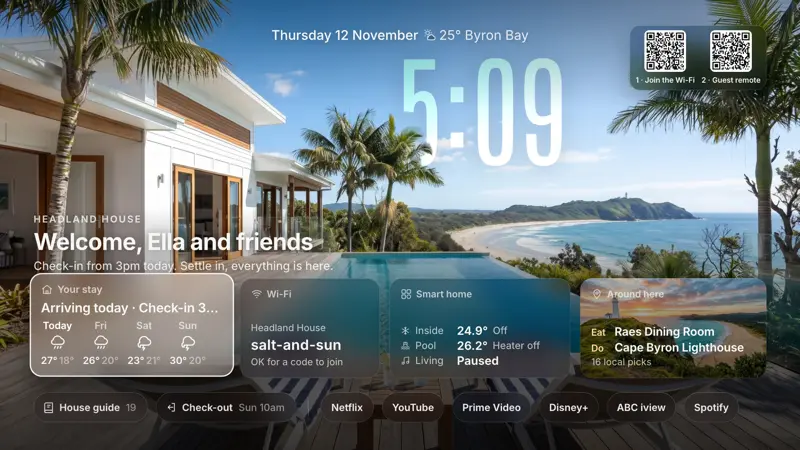
What you should see, with your own place, photo and Wi-Fi. Make it the home screen
Optional
Hold Back for a second (or press Menu on a Fire TV remote) for Guest TV's settings, and press Make Guest TV the home screen.
If Home still opens the TV's own home, switch on Home button watch there and in the TV's Settings, Accessibility. On a Fire TV, Amazon's Home button keeps Amazon's home: open Guest TV from the app row.
Try it like a guest
Scan the Guest remote code on the TV with your phone, then ask for something: "something funny to watch", "make my room cooler", "where's good for dinner?".
Good to know
- The computer stays on. It draws the welcome screen and runs the Guest remote. If it is off, the TV waits for it.
- Samsung, LG, Roku, Apple TV and the rest have no Downloader. Use AI setup or Computer setup, and check your TV first.
- Changed your mind? Remove it: nothing on the TV was switched off or deleted.